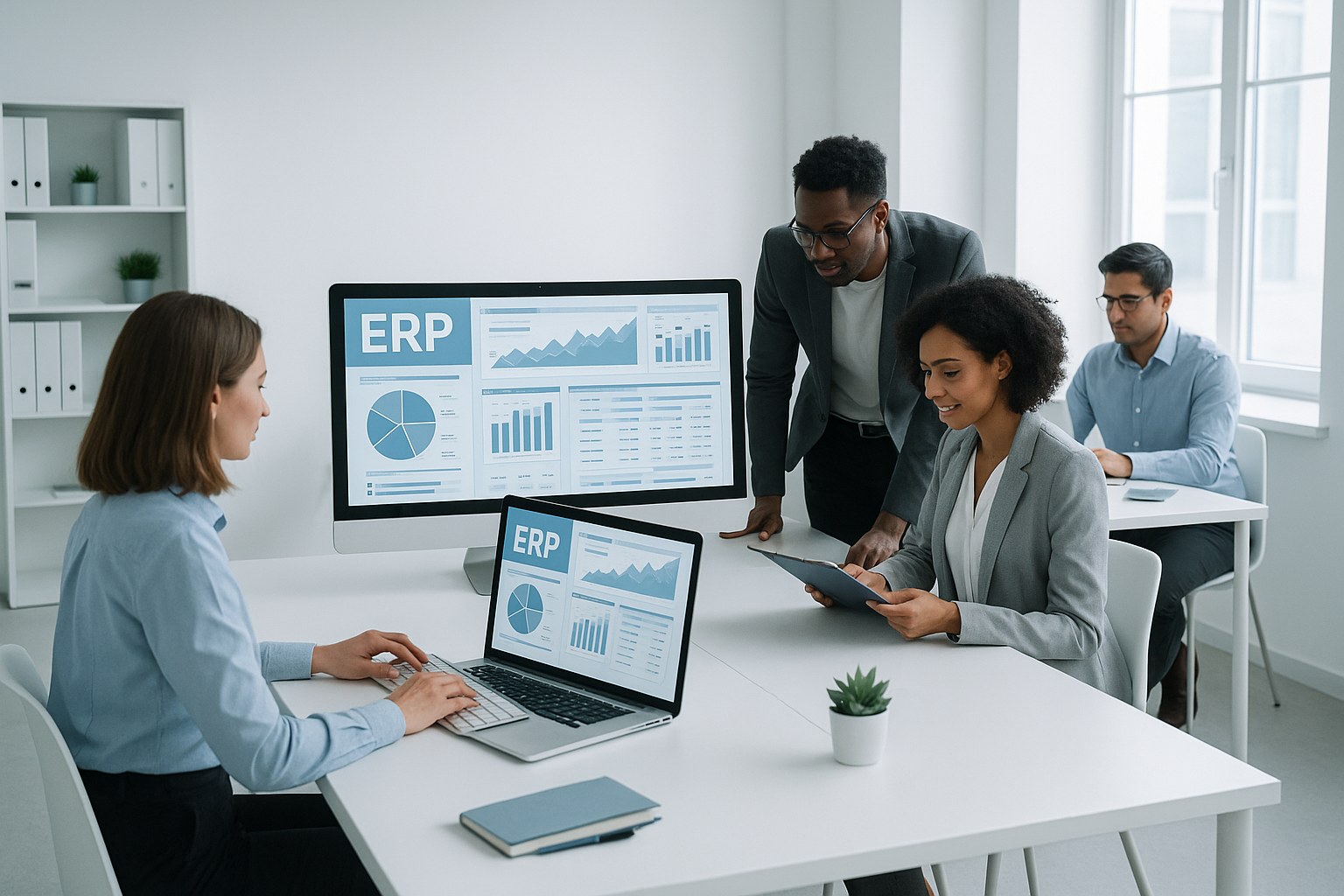
Why ERPNext for SMBs?
If you are looking forERP for small companiesthat gives you real control over production without high costs, ERPNext is a natural choice.
- No license fees- you save on software costs.
- Scalability– the system grows with your company.
- Simple operation– you don't need your own IT department.
- Mobile access- control production from your phone, wherever you are.
- Full control ofprocesses – from order to implementation.
For many companies, ERPNext is simply alicense-free production systemthat can be implemented sensibly and in stages.
See ready scope, price and constraints for simpler production.
Production Start PackageThe most common problems in production - and how ERPNext solves them
Problem: lack of control over the warehouse
You don't know how many raw materials are in the warehouse and whether there will be enough for subsequent orders.
Solution: live stock
ERPNext shows stock levels in real time and facilitates purchasing decisions.
Problem: difficult production planning
Deadlines slip away and priorities change during implementation.
Solution: online plan
Online production planningwith schedule and automatic calculation of material requirements.
Problem: chaos in orders
It is difficult to determine what is urgent, when and at what stage of implementation.
Solution: one view
All orders are in one place - with statuses, dates and activity history.
Problem: no information on production costs
It is unknown how much each batch actually costs to make.
Solution: Costs automatically
ERPNext calculates costs based on materials and labor, helping you make faster decisions.
Check how ERPNext will solve your problems.
Schedule a demoHow to deploy ERPNext in production?
The implementation of ERPNext in a manufacturing company can be carried out in stages. The system gives you full control over production - from ordering, through implementation, to quality control.
Key implementation steps:
- Process analysis- organizing the current way of working
- List of materials in one place- preparing a bill of materials (BOM)
- Station setup- configuration of machines and resources
- Data migration- import of products, materials and recipes
- Team training– quick implementation of operators and planners
Production Planning in ERPNext
The ERP production planning module in ERPNext allows you to create production orders based on orders or sales forecasts. The system automatically checks the availability of materials and suggests realistic deadlines.
Production planning functions:
- Production orders- automatic generation from orders
- Production schedule– visual calendar of machine load
- Demand for materials– automatic calculation of shortages
- Forecasting– planning based on sales history
Bill of materials (BOM) in ERPNext
The bill of materials (BOM)is a simple list: what and in what quantity is needed to make a product. In ERPNext you can create multi-level lists of components and substitutes.
List of materials in one place:
- Multi-level lists– semi-finished products and components
- Versioning– history of recipe changes
- Cost calculation– automatic calculation of production cost
- Alternative materials– substitutes in case of shortages
- Production steps- simple definition of operations
Production Schedule
Production schedulein ERPNext helps arrange orders in time to reduce downtime. The system takes into account the availability of machines, materials and employees.
Thanks to the visual schedule, you can:
- Track the load on workstations
- Identify bottlenecks
- Shift orders using the drag & drop method
- Monitor the progress of execution on an ongoing basis
Quality control in production
ERPNext allows you to set simple control points at every stage of production. You can use ready-made checklists and save measurement results.
Quality control functions:
- Checklists– parameters to be checked
- Delivery control– verification of materials from suppliers
- In-process inspection– checking semi-finished products
- Final inspection– verification of finished products
- Quality reports- trend analysis and statistics
Program for furniture manufacturers
ERPNext is especially popular amongfurniture manufacturers. The system copes well with:
- Product variants– colors, sizes, materials
- Cutting optimization– less material waste
- Batch tracking– identification of the origin of materials
- Project management– production to order
See ourcase study of a furniture manufacturer, which implemented ERPNext.
If you want a simpler, pre-described scope, see also theProduction Start packagefor MTO and MTS.
Our improvement: Production planning and management dashboard
The standard production module in ERPNext offers extensive hourly planning of each operation. Many manufacturing companies – especially smaller plants – don't need this level of detail. They care abouta simple, transparent division of orders betweenworkstations, taking into account the real capacity of each workstation on a given day.
That's why we have developed our ownproduction management and planning dashboard- a dedicated ERPNext extension that simplifies the daily work of the planner and operator. We implemented the solution for a client from the furniture industry and it worked from day one.
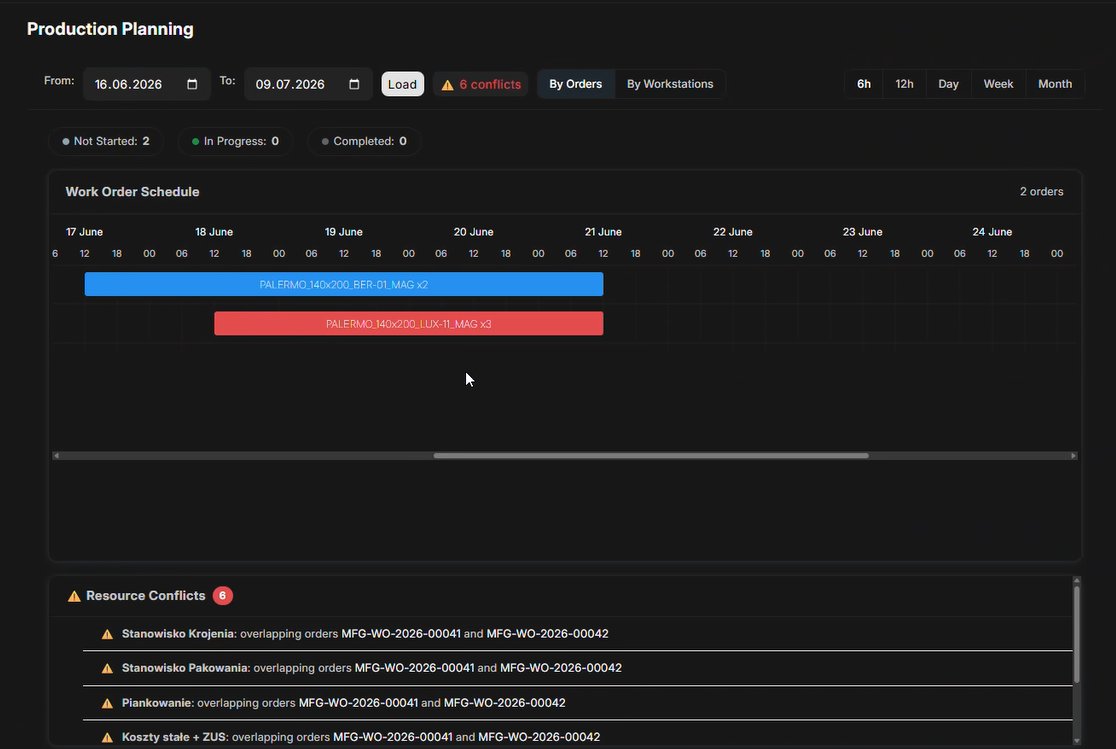
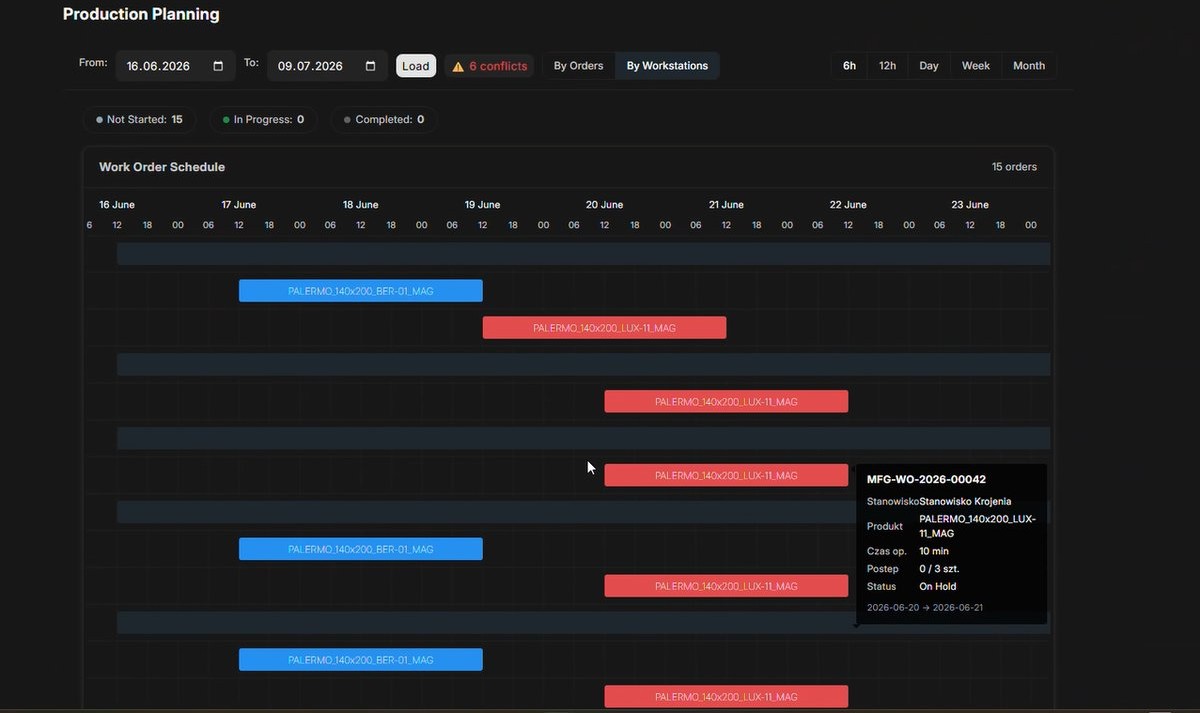
Scheduler Dashboard - Schedule View
We show the planner all production orders on the timeline, divided into workstations. Tasks are transferred between days and positions using the drag & drop method. The system immediately signals conflicts - when two orders overlap at the same workstation.
- Planning according to the capacity of workstations– the system shows the % load of each workstation, without manual conversion of hours
- Detection of resource conflicts– when two orders overlap at the same workstation, the system clearly signals it
- View by orders or positions- it is convenient for the planner to switch the perspective
- Planning in advance- usually 3 days in advance, with the possibility of postponement in the absence of the employee
Operator panel - workstation view
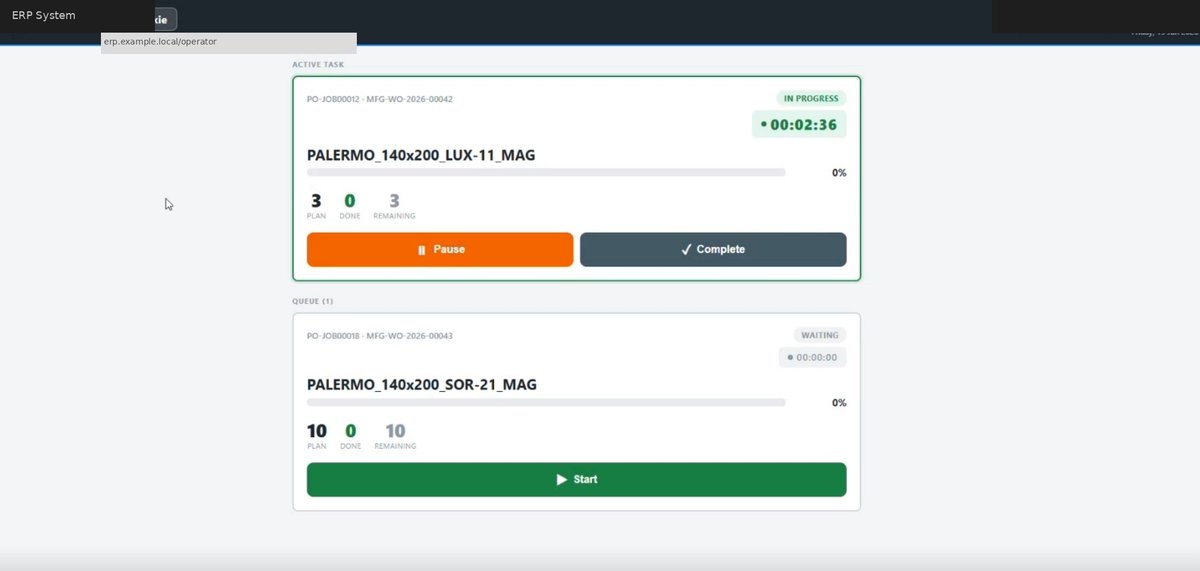
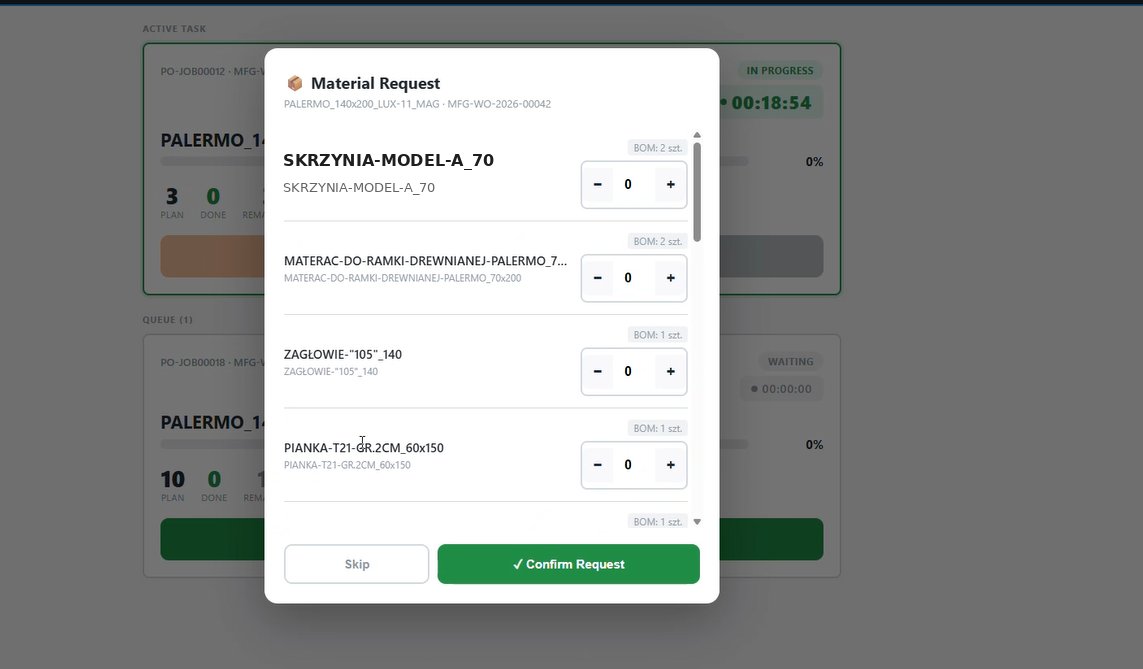
Each workstation has its own dedicated view: a list of tasks scheduled for today, with the order set by the planner. The operator sees what and how much he needs to do - without unnecessary information. Can mark a task as completed with one click.
- Worksheet on screen or printout- flexible: monitor in the hall or paper worksheet every morning - chosen by the company
- Confirmation of execution by the operator- the operator clicks "Done", the data goes to system without intermediaries
- Automatic settlement of materials– after completing the order, the BOM is settled automatically; the employee does not click on 15 material items
- Handling of material collection- the operator can report the need for materials straight from the workstation view
Key implementation benefits
- No more paper chaos- instead of sending a list via WhatsApp or printing Excel sheets, each workstation has an up-to-date online plan
- Capacity visibility- the system will tell you directly: "you have 200 orders for this week, but your line can only handle 100" - before you commit to the deadline
- Responding to absences- when an employee does not come to work, planners rearrange tasks in minutes, and the remaining positions receive an updated plan
- Data for material settlement- each completed order automatically settles the consumption of materials from the BOM, which simplifies inventory
- Measurement of operation time- the system collects data on the actual duration of the operation, which allows for more and more precise planning of processing capacity
- No need to train the entire crew- the planner operates the system; employees receive a simple worksheet or a screen with a list of tasks
"You have 200 orders at the end of the week, but the system should tell you that it is impossible - because you have a processing capacity of 100."
- Krzysztof Śliwa, ERPTech, during the presentation of the solution for a client from the furniture industry
The solution is ideal for companies that wantto go beyond Excel and tables, but do not need a full system (yet) APS. Deployment is quick - it relies on data that is already in ERPNext. Does not require any external licenses.
Want to see the desktop in action?
Schedule a free demoStart implementing ERPNext in production
Contact us to discuss implementing ERPNext in your manufacturing company. We offer free consultation and process analysis.
Schedule a free consultation